The familiar image editor feel, upgraded with modern features
Layers, effects, plugins. On Linux and macOS.
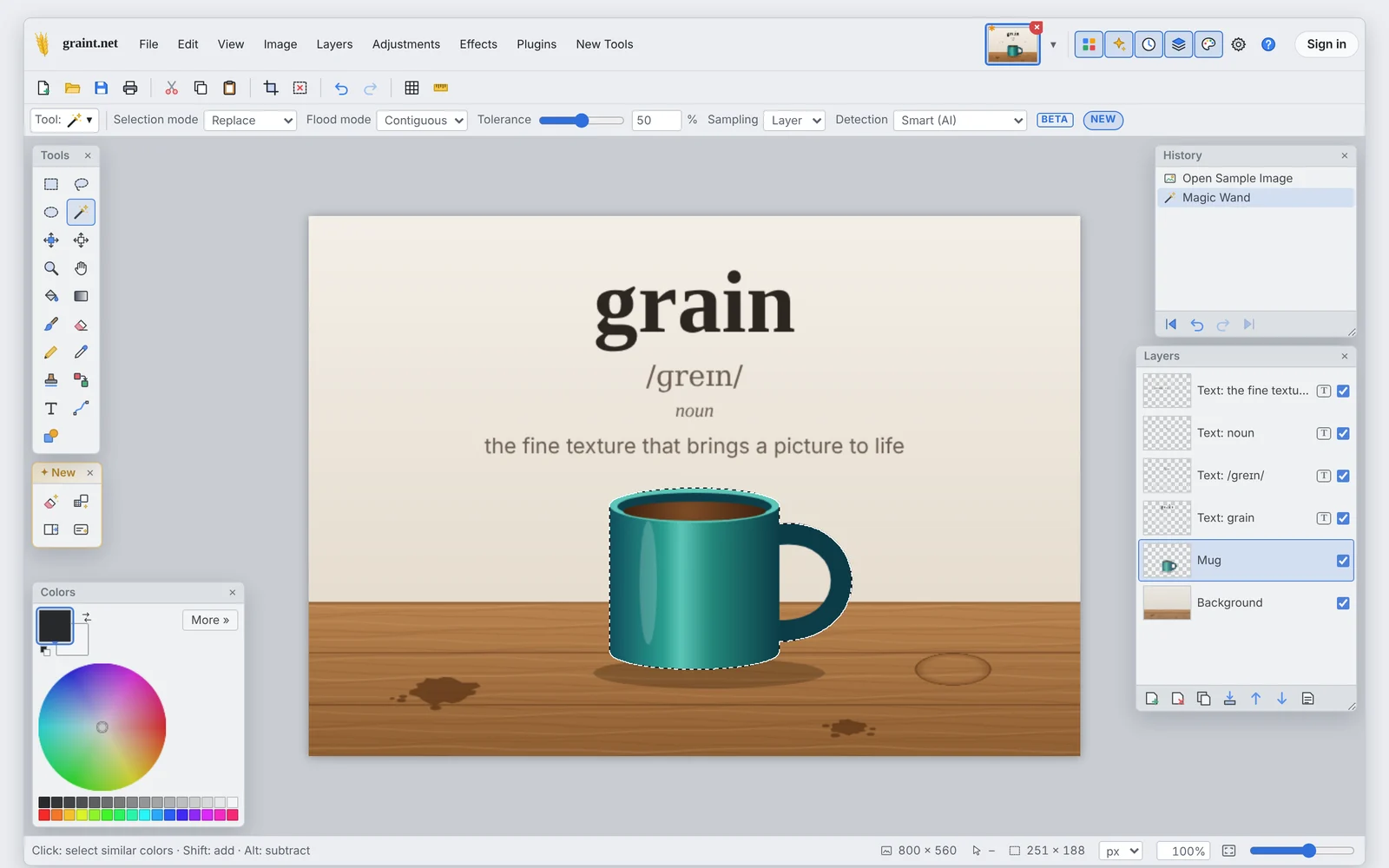
Open it and start editing. Layers, the magic wand and 18 plugins are built in, and there is nothing to install.
grain /ɡreɪn/ · noun. The fine texture of a photo. Add a t and you get graint.net.
What's in it
The tools you use every day
Layers and blend modes
Opacity, eleven blend modes, drag to reorder, merge down, flatten.
20 tools with one-key shortcuts
Selections, magic wand, brushes, gradient, clone stamp, recolor, text, lines and shapes.
Adjustments and effects
Levels, hue and saturation, blurs, noise, emboss, clouds. You see the result while you move the slider.
Plugins built in
Align, outline, drop shadow, color to alpha and 14 more, already there.
Object Eraser
Paint over a stain or a stray object and it disappears. The gap is filled from what's around it, right on your device.
Open formats
Save as .graint with all layers, or as PNG, JPEG and WebP. .pdn files open too, and autosave brings your work back after a crash.
AI tools when you want them
Fill a selection from a description, extend a photo past its edges, or change it with a sentence. These run in the cloud, only when you start them. Prices
Ad space. One ad per page, from developer and design tools.
Coming from Windows?
You'll find your way around quickly
- Tools on the left, history and layers on the right, colors bottom left
- The usual shortcuts: B brush, S select, M move, Ctrl+D deselect
- .pdn files open with their layers, names, opacity and blend modes
- Floating windows turn see-through when you paint underneath
Text stays editable
Each text gets its own layer. If you prefer the old way, there's a switch in the toolbar.
Smart magic wand
Follows the edges of an object instead of stopping at the first color change.
Rotate handle
A round handle above the frame rotates selections and pixels.
Object Eraser
Click a coffee stain and it's gone. Works offline.
Plugins
18 plugins, already installed
Rebuilt from the ones people recommend most.
Object6
- Align Object
- Outline Object
- Drop Shadow
- Feather Object
- Bevel Object
- Trim to Content
Transparency3
- Color to Alpha
- Black and Alpha
- Smooth Edges
Color2
- Gradient Map
- Color Balance
Frames and Grids3
- Border
- Grid and Checkerboard
- Rounded Corners
Distort3
- Perspective
- Kaleidoscope
- Reflection
Advanced1
- Script Lab
Money
What comes in, what goes out
Ads and donations on one side, hosting and the domain on the other. Updated once a month.
Support
Chip in if you like
Donations go toward hosting. They don't unlock anything; everyone gets the same editor.
Prototype: payment links and addresses are placeholders.
Install
As an app in your dock
Browsers can install graint.net like a normal program, with its own window.
Prototype: installing and offline mode come with the launch.
Chrome, Chromium, Edge
Open the editor, then click Install in the address bar or choose Help → Install as app.
Safari (macOS)
Open the editor, then File → Add to Dock.
Firefox
Firefox can't install web apps on the desktop. Pin the tab instead.
FAQ
Questions
Does it cost anything?
No. All tools, effects and plugins are free. Only the optional cloud AI tools cost money, and you pay what the AI provider charges us.
Why is there an ad on this page?
Hosting and the domain cost money. One ad per page covers part of it. The ads come from a network that sets no cookies and only shows developer and design tools. The editor has no ads.
Are my images uploaded?
Not while you edit, save or use the Object Eraser. An image only leaves your computer when you start a cloud AI tool yourself, and the editor asks first.
Which file formats?
PNG, JPEG, WebP and .graint. A .graint file is a plain ZIP with one PNG per layer, so you can always get your layers out. .pdn files open with their layers.
Do I need an account?
Only for the cloud AI tools, because they need a token balance. You can sign in with Google, Apple or an email address.
Does it work offline?
Yes, after the first visit, except for the cloud AI tools.
Is graint.net open source?
The editor core will be published at launch. Name and logo are excluded.
Who makes money from this?
Nobody, on purpose. The transparency page lists every euro in and out. AI tokens are sold at the provider's price; we add nothing.
Why “graint”?
Grain is the fine texture of a photo, and the logo is an ear of barley with a t. If the name sounds a bit familiar, that's intended.